AI Sales Assistants for Small Businesses - Scale Pipeline
Turn missed leads into revenue with an AI sales assistant that qualifies 24/7 across phone, SMS, web chat and WhatsApp. Practical playbook, scripts, ROI math.
Problem hook
Every missed call, unanswered chat, or slow reply is a lost chance to move a prospect toward a sale. Small sales teams spend hours on admin: qualifying leads, scheduling demos, updating CRMs, and following up — work that kills momentum and conversion. What if a reliable team member could handle first contact, qualify intent, and book meetings across phone, SMS, web chat and WhatsApp — around the clock and without adding headcount?
Why now: real adoption and measurable impact
AI sales tools are no longer experimental. Small businesses are adopting AI at accelerating rates, especially in firms with 10–100 employees where usage jumped significantly in 2025. (investor.thryv.com) Sales teams that use AI report measurable revenue advantages, and sales leaders say AI improves personalization and process optimization — both critical to closing deals faster. (salesforce.com) The market for voice and conversational agents is also expanding rapidly, making phone-based assistants practical for SMB budgets. (grandviewresearch.com) That said, adoption is uneven across industries and firm sizes — careful scoping matters. (read.oecd-ilibrary.org)
This article shows a practical, channel-by-channel playbook for deploying an AI sales assistant (an "AI Employee") that actually moves pipeline — with scripts, KPI math, and pitfalls to avoid.
What an AI sales assistant should do (and what it shouldn't)
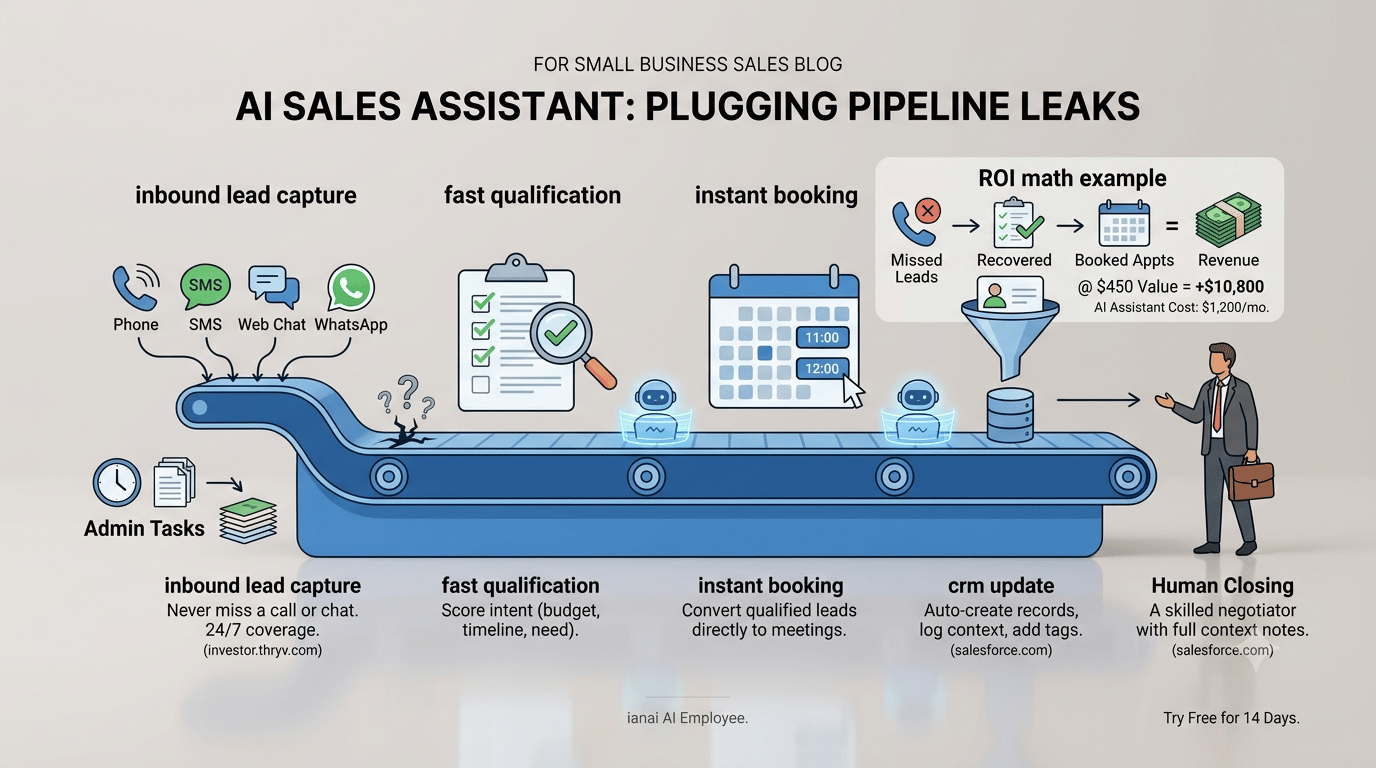
An effective AI sales assistant for small businesses handles the routine, high-volume tasks that cost reps time and convert poorly when delayed:
- Capture inbound leads from phone, web chat, SMS, WhatsApp and landing pages.
- Run a fast qualification script (budget, timeline, need, decision-maker).
- Book meetings or demos directly into calendars, including video links.
- Create and update CRM records (contact, company, lead source, tags).
- Trigger follow-up sequences and task assignments for humans when needed.
It should not:
- Make complex pricing or legal commitments without human approval.
- Pretend to be human or give warranties about outcomes.
- Replace skilled negotiation — it’s an amplifier, not a closer.
Channel-specific playbook and sample scripts
Design the assistant so each channel preserves context, uses short qualification paths, and always offers an immediate next step (book, quote, send details, connect to human).
Voice (phone)
Why: callers are high-intent; many SMBs still lose revenue to missed calls. Use an AI voice agent to answer after-hours and overflow, qualify, and schedule.
Core script (30–60 seconds):
"Hi — I’m the [Business Name] assistant. I can book a visit or get a quick estimate. What brings you in today?"
Follow-up qualifiers (single-line responses):
- "Is this for a new installation or service?" (new/service)
- "When do you need this done?" (ASAP / within 2 weeks / flexible)
- "Can I get your address and best call-back number?"
Close: "Great — I can book our tech for [two available slots]. Which works best? If you want a human now, I can patch you through."
SMS
Why: fast, low-friction, and perfect for follow-up after missed calls.
Templates (concise, 1–2 messages):
- Initial: "Thanks for contacting [Business]. Quick Q: Is this a new order or support? Reply 1=New, 2=Support."
- If 1: "Thanks — do you want a quick quote or a site visit? Reply Q=Quote, V=Visit."
WhatsApp / Rich messaging
Why: allows buttons, images, and persistent context (great for attachments like photos of the problem).
Suggested flow:
- Greeting with buttons: [Get a quote] [Book a visit] [Talk to human]
- If [Get a quote]: ask 2–3 qualifiers, ask for a photo, then return an estimated ballpark price and a suggested slot to book.
Web chat
Why: captures website visitors and converts them into booked demos or calls.
Best practice: limit qualification to three questions on first contact. Offer immediate calendar links if intent is high.
Example chat script:
- Bot: "Welcome — are you researching or ready to buy?" [Researching] [Ready]
- If Ready: "Great. How many seats/services/products do you need?" -> show calendar options.
Cross-channel continuity
Ensure the assistant logs context to the CRM and keeps a single conversation thread per lead: if a visitor starts on web chat and later calls, the assistant should surface prior chat notes to the caller and the human rep.
7-step deployment playbook for SMBs
1) Map your lead sources and channels.
- Identify high-volume entry points: website contact form, phone, Google Business Profile calls, Facebook/Instagram messages, WhatsApp.
2) Define the qualification criteria and the exact handoff moment.
- Keep phone scripts to 3–5 qualifiers. Define a clear SLA: e.g., any lead scoring >=7 gets a human callback within 1 business hour.
3) Integrate with your CRM and calendar.
- Auto-create contacts, tag lead source, and add meeting invites. Make sure the CRM mapping is tested for edge cases (duplicate detection, multi-location businesses).
4) Build channel-specific flows and short scripts.
- Start with voice + SMS + web chat for 60–80% coverage, then add WhatsApp where your customers are.
5) Establish safety rules and approval gates.
- Limit action scope: pricing above $X requires human approval; refunds are never final without a human sign-off.
6) Measure the right KPIs from day one.
- Track time-to-first-contact, booking rate from AI-handled leads, lead-to-opportunity conversion, and percentage of leads handed off to humans.
7) Iterate weekly for 6–8 weeks.
- Use real transcripts to tighten qualifiers and add micro-prompts that raise booking rates.
Metrics, sample ROI math, and a realistic target
Track these KPIs:
- Lead capture rate: percent of inbound leads captured by the assistant.
- Time-to-first-contact: minutes from lead arrival to first reply.
- Booking rate: percent of AI-qualified leads that convert to a meeting or quote.
- Lead-to-revenue conversion: percent of booked meetings that close.
- Cost per booked meeting (including subscription + tooling).
Sample ROI (local HVAC business, conservative):
- Monthly inbound leads: 400 (calls + chat + SMS)
- Missed or unqualified now: 30% (120 leads)
- With AI assistant capture of 80% of those missed leads = 96 recovered leads
- Booking rate from recovered leads: 25% => 24 additional booked appointments
- Average job value: $450
- Monthly incremental revenue = 24 $450 = $10,800
- AI platform + telephony + SMS + integrations = $1,200/month
- Net incremental revenue ≈ $9,600/month
That’s a simple, conservative example: even modest booking lift on high-average-revenue services pays for itself quickly.
Real-world considerations and common pitfalls
- Over-qualification: Long, multi-step scripts kill conversion. Keep the qualification path short and actionable.
- Bad handoffs: If the human rep gets an email with no context, the lead cools. Always push full transcripts and a short "why this is qualified" note to humans.
- Compliance and privacy: store consent flags when saving customer contacts and be transparent about automated interactions.
- Customer experience: never pretend the assistant is human — transparency boosts trust and reduces complaints.
Example templates you can copy (voice + SMS + WhatsApp)
Voice quick-qualifier (text you can convert to speech):
"Thanks for calling [Business]. Are you calling about a new job or a follow-up?"
- If new: "Great. Is the address inside [city] service area?" -> "When would you like us to visit? We have [date/time options]."
SMS follow-up after missed call:
WhatsApp quick flow:
- Bot: "Hi — send a photo of the issue or choose: [Get quote] [Book visit] [Talk human]"
- If photo received: "Thanks — based on that, ballpark is $X–$Y. Want to book a time to inspect?"
Measurement cadence and optimization hacks
- Week 0–2: Baseline metrics and ensure CRM mapping works (time-to-first-contact, capture rate).
- Week 3–6: A/B test two voice openings and two SMS CTAs. Measure booking lift.
- Month 2–3: Introduce dynamic lead scoring (source + intent + time of day) and route highest scores to humans immediately.
Optimization hacks:
- Use short multi-choice buttons in SMS/WhatsApp to raise reply rates by 20–40% vs free-text.
- Offer two calendar slots instead of an open scheduler — people pick faster.
- Recycle cold leads monthly with a short 2-message win-back sequence.
When to hire a human vs expand the AI scope
Keep humans on high-value negotiations, custom pricing, and complex objections. Expand AI scope when:
- AI booking conversion is >20% of all meetings.
- Time-to-first-contact by AI is under 5 minutes and booking rate outperforms the baseline.
- You have repeatable tasks (quotes under X, routine rescheduling) that can be systematized.
Closing: first steps you can take today
- Run a 30-day capture experiment on one channel (phone or web chat).
- Limit the first script to three qualifiers + calendar offer.
- Measure booking lift and CRM completeness.
AI sales assistants are not a silver bullet, but when deployed with short scripts, clear handoffs, and CRM integration they turn lost contacts into measurable pipeline. With adoption rising among small businesses and proven impact on sales teams, the practical next move is a focused pilot that protects revenue and frees your reps for closing.
If you want a tested starting template and voice + SMS scripts customized to your industry (HVAC, legal, e-commerce, or professional services), try ianai AI Employee free for 14 days — set up a pilot, capture missed leads, and measure the real lift in booked revenue.