Fewer Apps, More Value: Integrated ERP Beats Sprawl for SMBs
Cut costs, risk, and decision drag by consolidating tools into an integrated ERP ecosystem. Learn the ROI math, 90‑day playbook, and stack patterns that work.
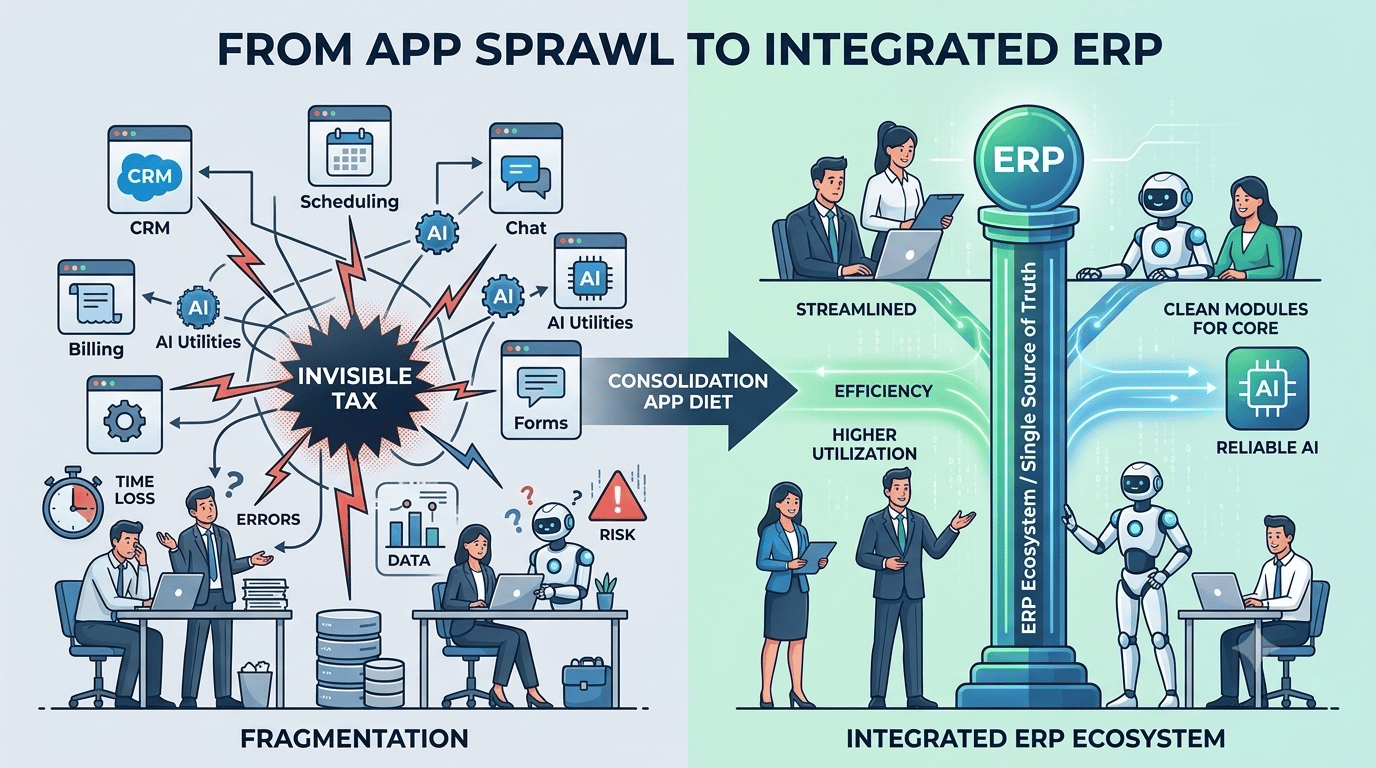
You don’t need another app. You need fewer.
If your team jumps between billing, CRM, scheduling, chat, forms, and a couple of AI utilities just to serve one customer, your stack is paying an invisible tax in time, errors, and risk. Consolidating around an integrated ERP ecosystem—rather than piling on point tools—cuts that tax while making every employee (human or AI) more effective.
The hidden tax of app sprawl
Most teams feel app sprawl long before they can measure it. Licenses look “cheap” in isolation, but the all‑in cost of fragmentation shows up elsewhere: missed handoffs, manual exports, broken zaps, duplicate customer records, and security reviews that never end.
Consider a few signals from recent industry data:
- Okta’s 2025 Businesses at Work analysis shows the average organization using 101 apps globally in 2024, with U.S. companies averaging 114—crossing three digits for the first time. (okta.com)
- Zylo’s portfolio telemetry found that nine new unique apps enter the average company every month, fueling constant growth unless someone actively removes redundancy. (zylo.com)
- BetterCloud’s State of SaaS 2025 reports enduring concern about shadow IT; a majority of IT teams still worry about unauthorized apps and are actively consolidating redundant tools and bringing more apps under IT management. (pages.bettercloud.com)
- For SMBs specifically, JumpCloud’s Q1 2025 SME survey found 58% of admins discovered employees using unsanctioned apps, 66% lack tools to even discover all SaaS in use, and 60% estimate workers use six or more unauthorized apps. (jumpcloud.com)
Why it matters: fragmentation multiplies costs your P&L doesn’t label “software.”
- License waste and duplication: Similar tools proliferate across teams with minimal governance.
- Integration maintenance: IT spends substantial time wiring APIs and fixing brittle connectors. MuleSoft’s 2025 benchmark found roughly 39% of developer time goes to custom integrations. (salesforce.com)
- Training and onboarding: Every extra app is another login, permission model, and workflow to learn.
- Decision drag: When data lives in silos, employees guess—or wait—rather than act.
- Security surface area: Every app adds vendors, credentials, and audit scope. BetterCloud and JumpCloud both show shadow IT remains a top risk vector for SMB IT. (pages.bettercloud.com)
And the kicker: if you intend to use AI agents, fragmented data will blunt their value. MuleSoft’s 2026 analysis highlights that most IT leaders believe AI agents create complexity—not leverage—without clean, unified integration. (blogs.mulesoft.com)
What an “integrated ERP ecosystem” really means
“ERP” used to imply a monolith. In 2026, think ecosystem: a configurable system of record (customers, orders, inventory, projects, financials) with modular capabilities, a vetted marketplace of extensions, and an event‑first integration layer.
Key properties to look for:
- A single source of truth for operational and financial data
- Native modules for the 3–5 core jobs your business must do daily
- Modern APIs and webhooks for real‑time events (not just nightly batch syncs)
- Role‑based access and audit trails that shrink compliance scope
- A small number of high‑leverage extensions (e.g., e‑commerce channel, field ops, HR/payroll) vetted by the platform
- Out‑of‑the‑box identity integration (SSO/MFA) so IT controls access centrally
This architecture consolidates work into one consistent “spine,” so humans and AI agents operate from the same facts and can take decisive action without swivel‑chair integration.
Why this is a better foundation for AI
Enterprise research shows organizations run hundreds of apps, but only a minority are integrated. MuleSoft’s 2025 report cites an average of 897 apps at the enterprise level, with only around 29% integrated—meaning data remains marooned in silos. That’s exactly where AI trips over stale or partial records and brittle workflow triggers. (salesforce.com)
Practical stack patterns that use fewer apps (and do more)
Below are three condensed, high‑leverage patterns we see working for small and mid‑sized businesses. Swap specific vendors to match your industry—keep the pattern.
1) Service and trades (HVAC, plumbing, electrical)
- ERP spine: Work orders, dispatch, inventory, and accounting in one platform
- Extensions: Payments, customer messaging, route optimization
- Integrations: Lightweight connections to mapping and parts suppliers via vetted connectors
Workflow: A lead books a diagnostic. The job auto‑creates in ERP, inventory is reserved, tech is routed, and an estimate is generated on site. When the customer approves, the ERP updates the job, books revenue, and syncs payments—no spreadsheets, no double entry. An AI voice agent can answer after‑hours calls, check inventory, and book jobs because it’s reading and writing against the same ERP records the office uses.
Result: Fewer tabs, faster cash collection, and one source of truth for customers and equipment. Your “AI field dispatcher” only works reliably because the data foundation is tight.
2) E‑commerce brand with first‑party fulfillment
- ERP spine: Orders, inventory, purchasing, and financials
- Extensions: Shopping cart/channel, 3PL/WMS, returns portal from the ERP marketplace
- Integrations: Single product and inventory feed to every channel; finance closes on the same item and order IDs
Workflow: Campaign drives a sales spike. The ERP updates channel availability in minutes, auto‑triggers purchase orders to vendors at thresholds, and gives support a live order status. AI chat can answer “Where’s my order?” with carrier‑grade details because shipment events stream into the same system that created the order.
Result: Fewer stockouts, cleaner close, and service that doesn’t copy‑paste from one system to another.
3) Professional services and agencies
- ERP spine: Projects, time/expense, invoicing, and GL
- Extensions: Proposal/e‑signature, payroll, business intelligence
- Integrations: Calendar and docs for time capture; CRM for pipeline to project handoff
Workflow: A signed SOW converts to a project with rates and milestones. Time entries from calendar/docs land in the project, invoices go out on schedule, and AR syncs to cash. An AI assistant can generate weekly project health summaries and nudge late timesheets, because milestones, budgets, and actuals live together.
Result: Higher utilization, cleaner forecasting, and on‑time invoicing—without five separate tools to reconcile.
The 90‑day “app diet” playbook
You don’t need a yearlong transformation to get value. Run a focused 90‑day sprint that consolidates around your ERP spine.
1) Days 0–15: Inventory and usage
- Pull identity logs (SSO if you have it) and corporate card statements. Tag every app with owner, purpose, # of users, and whether it touches customer or financial data.
- Flag duplicates and low‑usage apps. Note which workflows they support today.
- For SMB IT teams, visibility itself is often the blocker—two‑thirds report lacking SaaS discovery capability. Fix that first with identity and network visibility. (jumpcloud.com)
2) Days 16–30: Map the value stream and decide
- Pick 3–5 core flows (lead→job, order→cash, ticket→resolution, project→invoice). For each, identify the minimum set of systems needed if the ERP is your spine.
- Triage each app: replace (ERP module exists), integrate (ERP‑vetted connector, limited scope), or eliminate (duplicate/unused). Many IT teams are doing this now—industry data shows active consolidation of redundant tools. (pages.bettercloud.com)
3) Days 31–60: Integrate and migrate
- Turn on ERP modules that replace point tools. Migrate data with simple rules and freeze changes during cutover windows.
- Where you must integrate, prefer events/webhooks over nightly batch. Keep transformations in a single place.
- Document owners and success metrics for each consolidated flow.
4) Days 61–90: Decommission and lock in
- Turn off old connectors and user accounts. Reclaim and right‑size licenses. Update runbooks.
- Move authentication to SSO with MFA. This reduces the attack surface and makes offboarding clean. Shadow IT is a persistent risk—centralize control to bend the curve. (pages.bettercloud.com)
ROI model: fewer apps vs. more (with numbers you can adapt)
Use this quick model to estimate the impact before you begin.
Assumptions (example mid‑market services firm):
- 85 employees; 60 knowledge workers on software daily
- Current stack: 28 apps touching core workflows
- Average seat cost across stack: $150 per user per month
- 10 tools are duplicative or replaced by ERP modules
- IT spends 25% of an engineer’s time maintaining point‑to‑point integrations today
Back‑of‑the‑envelope math:
Adjust the seat counts and wages for your business. If you’re a larger org with heavier integration work, the “dev time reclaimed” line item grows quickly. Industry benchmarks show integration consumes a large share of developer capacity; eliminating brittle custom links pays for itself. (salesforce.com)
Build the integration core before you scale AI
AI agents only help if they can see and do things in one reliable system. Two data points to keep in mind as you plan:
- Only a minority of enterprise apps are integrated; one analysis pegs integrated apps at roughly 29% on average. That’s a warning, not a target. (salesforce.com)
- IT leaders overwhelmingly say that without proper integration, AI agents add complexity rather than value. In other words, integration is a prerequisite for useful automation. (blogs.mulesoft.com)
When you consolidate around an ERP spine, you give your automation—and your future AI employees—a single, trusted place to read and write data. That’s why AI voice agents for small businesses perform dramatically better when they can book work, check inventory, update invoices, and read job history directly in the ERP, not by scraping five point tools.
How ianai AI Employee fits your integrated ERP
ianai AI Employee isn’t another disconnected chatbot. It’s an AI teammate that plugs into your ERP ecosystem and takes real action:
- Phone coverage with AI voice agents that answer, qualify, and schedule directly against ERP data
- Channel agents for SMS, web chat, Telegram, and WhatsApp that see the same order, job, or project the back office sees
- Workflow automation that updates records, triggers the next step, and closes the loop across your stack
Because ianai operates against your system of record, every interaction is auditable, permissions‑aware, and instantly reflected on your dashboards. That’s the opposite of app sprawl—it’s leverage from a single, integrated core.
Make “fewer apps” your 12‑month advantage
You can keep adding point tools and hope for the best, or you can consolidate around an integrated ERP ecosystem that simplifies work, reduces risk, and unlocks automation that actually helps. The data is clear: portfolios keep growing by default, shadow IT is real, and integration work eats precious time. Push back by designing for fewer, better‑connected systems. (zylo.com)
Want to see what this looks like with an AI Employee connected to your ERP? Schedule a working session with our team. We’ll map one of your core flows, show how ianai plugs in, and give you a concrete 90‑day plan to reduce apps—and increase output.