Why Your Business Needs an AI Employee, Not Another Chatbot
Chatbots answer questions from scripts. AI Employees connect to your ERP, take real action, and work like a member of your team. Here is why the difference matters.
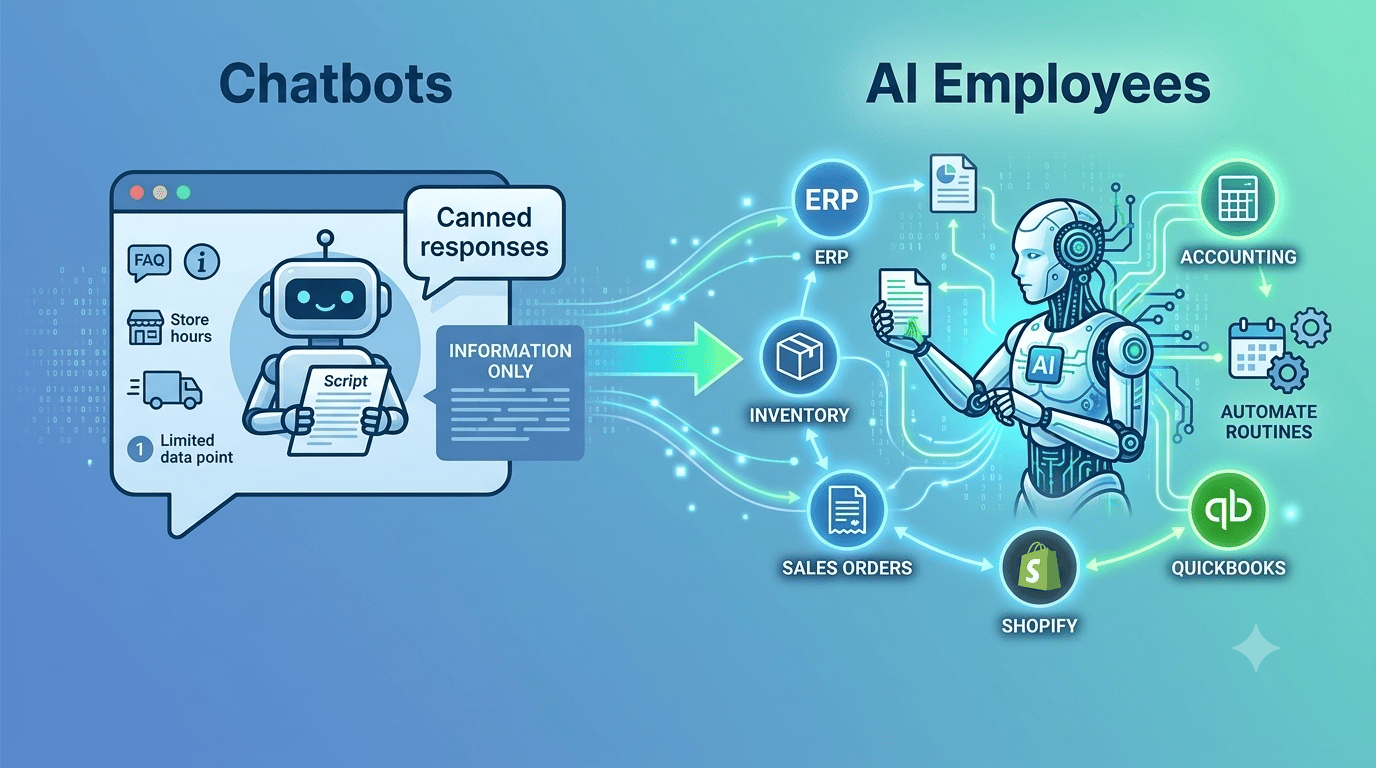
The Chatbot Promise — and Its Limits
Over the past decade, businesses have invested heavily in chatbots. The promise was compelling: let software handle routine customer inquiries so your team can focus on higher-value work. And for simple FAQ-style interactions — store hours, shipping policies, password resets — chatbots delivered.
But as businesses tried to push chatbots further, cracks appeared. A customer asks "Where is my order?" and the chatbot cannot actually look it up. A sales rep wants a quick inventory check and gets a scripted response pointing to a different system. The chatbot knows what you told it to say, but it has no idea what is actually happening in your business.
The fundamental problem is simple: traditional chatbots are not connected to your business data, and they cannot take action. They are digital scripts, not digital workers.
What Makes an AI Employee Different
An AI Employee is built on a fundamentally different architecture. Instead of following pre-written scripts, it connects directly to your business systems — your ERP, accounting platform, or point-of-sale — and performs real tasks using live data.
Here is a concrete comparison:
Chatbot: "I can help you with that! Please contact our sales team at sales@example.com for order status."
AI Employee: "Order #4821 for Acme Corp shipped yesterday via FedEx. The tracking number is 7891-2345-6789. Estimated delivery is Thursday. Would you like me to send the tracking details to the customer?"
The AI Employee does not just know about your business — it works inside your business. It reads your sales orders, checks your inventory, looks up customer accounts, and generates reports from your actual data.
Real Actions, Not Canned Responses
The most important distinction is what happens after the conversation. A chatbot ends with information. An AI Employee ends with action.
Here are tasks that AI Employees handle every day:
- Check real-time inventory and flag items below reorder points.
- Create draft sales orders from a customer conversation on Telegram or Slack.
- Generate accounts receivable aging reports on demand.
- Look up vendor payment status and outstanding purchase orders.
- Run daily sales summaries automatically at 8 AM without being asked.
- Monitor stock levels and alert you when a warehouse transfer is needed.
Each of these requires access to live ERP data and the ability to write back to your systems. No chatbot can do this because no chatbot was designed to.
How It Works: The Building Blocks
An AI Employee is built from four components that work together:
Personas
Every AI Employee starts with a persona — a pre-configured role that defines its capabilities and behavior. A Sales Representative persona comes equipped with tools for managing orders, customers, and leads. A Customer Support persona focuses on order lookups and issue resolution. You pick the role, and the AI Employee arrives ready to work.
Tools
Tools are the specific capabilities your AI Employee can use. Depending on your integration, you may have access to over 149 tools spanning sales, invoicing, inventory, purchasing, financial reporting, and more. The persona determines which tools are active, but you can customize the set at any time.
Knowledge Base
Upload your return policy, pricing guidelines, approval workflows, or any other business documentation. The AI Employee references these materials when handling tasks, ensuring it follows your rules — not generic assumptions.
Routines
Routines turn your AI Employee from a reactive assistant into a proactive worker. Schedule a daily sales summary, a weekly inventory check, or a monthly AR aging report. The AI Employee runs the task on time, every time, without being asked.
Connected to Your Systems
AI Employees integrate with the platforms you already use:
- ianai ERP — Full access to all 149 tools across every business function.
- QuickBooks Online — Invoicing, customers, vendors, inventory, and financial tools.
- Shopify POS — Sales, customer management, inventory, and order processing.
- Communication channels — Telegram, Slack, WhatsApp, email, web chat, and SMS.
The connection takes minutes, not months. OAuth flows handle authorization, and your AI Employee starts working immediately with the data and capabilities available through your platform.
Getting Started Takes 10 Minutes
There is no lengthy implementation project. The onboarding process is straightforward:
- Create your account and set up your company profile.
- Connect your ERP, accounting, or POS system.
- Choose a persona template that matches the role you need.
- Name your AI Employee and customize if needed.
- Start chatting — or connect a communication channel for your team.
Your AI Employee is operational in minutes, not weeks. And because it learns from your knowledge base and procedures, it gets more valuable over time as you teach it your specific business context.
The Bottom Line
Chatbots were a stepping stone. They proved that people are willing to interact with software conversationally. But they stopped short of doing real work. AI Employees pick up where chatbots left off — connecting to your live business data, taking meaningful action, and working alongside your team as a genuine digital colleague.
If your chatbot cannot look up an order, create an invoice, or tell you what is in stock — it is time to hire an AI Employee.